
Enterprise AI, cloud modernization, cybersecurity and platform engineering.
Resources › Implementation Guide

Custom Cribl Packs: AWS Security Lake to Sentinel

iNET SYSTEMS SecOps Practice • Published • Last updated • 2 min read
Reviewed by iNET SYSTEMS Architecture Practice

Recently, we were given a task with no plug-and-play solution: collect logs from Amazon Web Services (AWS) Security Lake and send them to Microsoft Sentinel through Cribl Stream. Here is how we solved it.

The challenge

SourceAWS Security Lake

Stores data in OCSF (Open Cybersecurity Schema Framework).

PipelineCribl Stream

No official Cribl pack existed to convert OCSF to CEF.

DestinationMicrosoft Sentinel

Expects CEF (Common Event Format).

The solution: five custom Cribl packs

We built five custom Cribl packs from scratch. Each one normalizes and routes the logs from one source:

At a glance

01

AWS CloudTrail

Account and application programming interface (API) activity across your AWS accounts.

02

Amazon Route 53

Domain Name System (DNS) query logs, useful for spotting suspicious domains.

03

VPC Flow Logs

Network traffic between and out of your virtual private clouds (VPCs).

04

AWS Security Hub

Security findings collected from across AWS services.

05

Palo Alto firewall

Firewall traffic and threat logs from the network edge.

Each pack converts the raw OCSF data into Sentinel-ready CEF and routes it to the right place. That gives the security team full log visibility across the cloud and security layers.
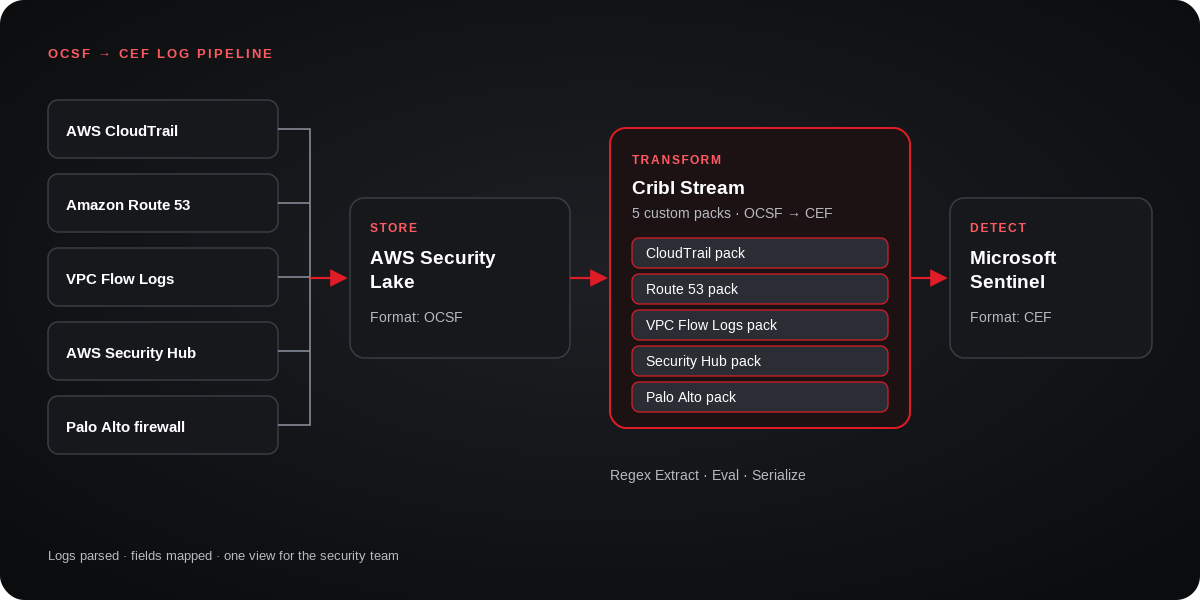
Diagram: five log sources land in AWS Security Lake as OCSF, five custom Cribl Stream packs convert them to CEF, and Microsoft Sentinel receives the events
The full pipeline: five sources, five packs, one security information and event management (SIEM).

How it works

The work started with research: comparing the OCSF and CEF schemas field by field, so nothing important was lost. Then we built dynamic pipelines in Cribl using functions such as Regex Extract, Eval and Serialize to reshape each record into the format Sentinel expects.

The result

Logs parsed. All five sources now flow into Sentinel without gaps.

Fields mapped. Detection rules, workbooks and hunting queries work as expected.

Teams empowered. Analysts see cloud and firewall activity in one place, with insights they can act on.

It was an exciting technical journey, from studying schemas to building pipelines that just work.

Bridging OCSF and CEF?

If you are working on something similar, we would be happy to connect and help.

Get in Touch

Questions about this article

Why were custom Cribl packs needed?

AWS Security Lake stores data in OCSF, Microsoft Sentinel expects CEF, and no official Cribl pack converted OCSF to CEF.

Which log sources do the packs cover?

AWS CloudTrail, Amazon Route 53, virtual private cloud (VPC) Flow Logs, AWS Security Hub and Palo Alto firewall logs.

How were the logs converted?

The OCSF and CEF schemas were compared field by field, then Cribl pipelines using functions such as Regex Extract, Eval and Serialize reshaped each record into the format Sentinel expects.

Related service

Microsoft Sentinel SIEM and SOAR

Microsoft Sentinel engineering for log collection, Kusto Query Language (KQL) detections, MITRE Adversarial Tactics, Techniques and Common Knowledge (ATT&CK) coverage, security orchestration, automation and response (SOAR) playbooks and ingestion cost control.

Explore Microsoft Sentinel SIEM and SOAR

Further reading

Source and what it covers
What is Amazon Security Lake?
AWS. AWS's service for centralizing security data in the OCSF format.
Cribl documentation
Cribl. Cribl's documentation for routing and shaping log and telemetry data.
What is Microsoft Sentinel?
Microsoft. Microsoft's cloud-native SIEM and SOAR for collecting, detecting and responding to threats.
Talk to us

Want help putting this to work?

We can help you turn these steps into a plan that fits your team.

New to iNET SYSTEMS? Meet our founder, see how we work, read the FAQs or start with an AI Security Readiness Assessment.

Book a 30-minute Call
Contact us