Welcome to our series on cloud-native applications with Azure Kubernetes Service (AKS). If you are curious about modern container orchestration, easy scaling and secure cloud deployments, this series is for you.
What is AKS?
Azure Kubernetes Service (AKS) is a fully managed container orchestration service from Microsoft Azure. It lets developers and DevOps teams deploy, manage and scale containerized apps with ease. Microsoft runs the Kubernetes control plane, so your team can focus on the apps instead of the infrastructure.
In short: AKS gives you the power of Kubernetes without the work of building, patching and upgrading it yourself.
What this series covers
In each post, we share practical tips and real-world use cases for AKS. Here is what to expect:
Getting started
Create your first cluster on Azure and choose the right deployment options.
Performance and scale
Get the most from your apps and scale them easily as demand changes.
Security best practices
Network policies, Kubernetes RBAC and Microsoft Entra ID integration.
Monitoring and diagnostics
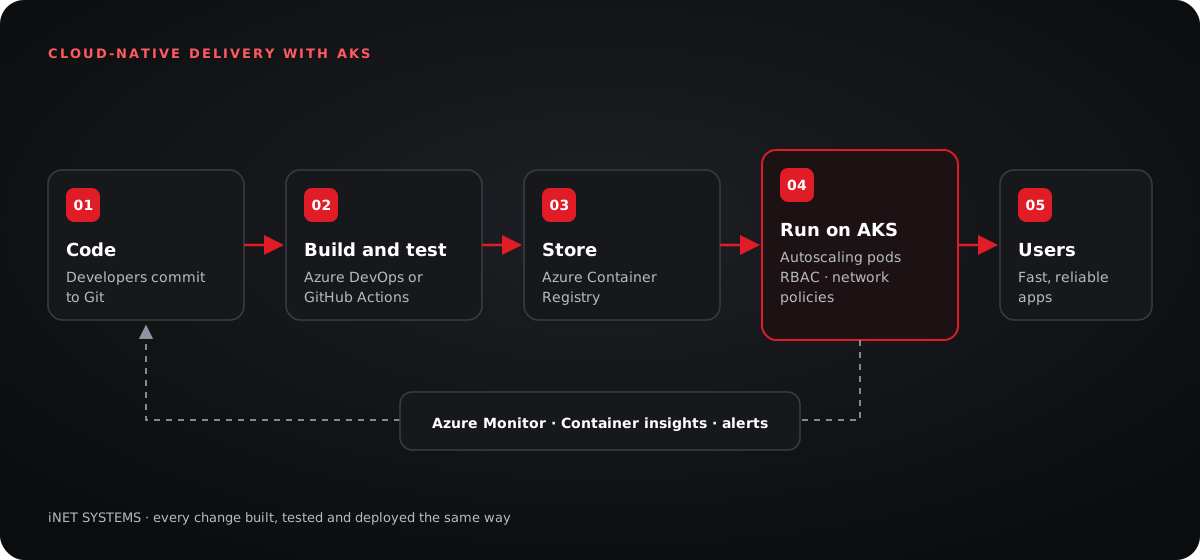
Keep watch over clusters and apps with Azure Monitor and Container insights.
Continuous deployment
Fast, reliable releases with CI/CD pipelines in Azure DevOps or GitHub Actions.
Real-world stories
Case studies where AKS solved real problems and improved user experience.
Getting started with AKS
You can create a first cluster in minutes with the Azure portal, the Azure CLI or Terraform. For production, plan the network, the sign-in model and the node sizes first, because these choices are hard to change later.
Performance and scalability
Set resource requests and limits for each app, so one busy service cannot slow down the rest. Turn on the cluster autoscaler and the horizontal pod autoscaler, so capacity follows demand automatically.
Security best practices
Use Microsoft Entra ID (formerly Azure AD) for sign-in and Kubernetes RBAC to control who can do what. Add network policies so services only talk to what they need. Keep secrets in Azure Key Vault, and scan container images in Azure Container Registry before they ship.
Monitoring and diagnostics
Azure Monitor and Container insights show how your clusters and apps are doing. Alert on the few signals that matter most, such as errors, latency and failed deployments.
Continuous deployment
Connect AKS to Azure DevOps or GitHub Actions, so every change is built, tested and deployed the same way. Releases get faster and safer, and a bad change can be rolled back in minutes.
Stay informed
We will keep sharing AKS developments, best practices and use cases from the cloud-native community. Follow our blog for the next posts in this series.
Happy cloud computing,
Taha Khan
Running Kubernetes on Azure?
We design, secure and run AKS platforms for teams of every size.