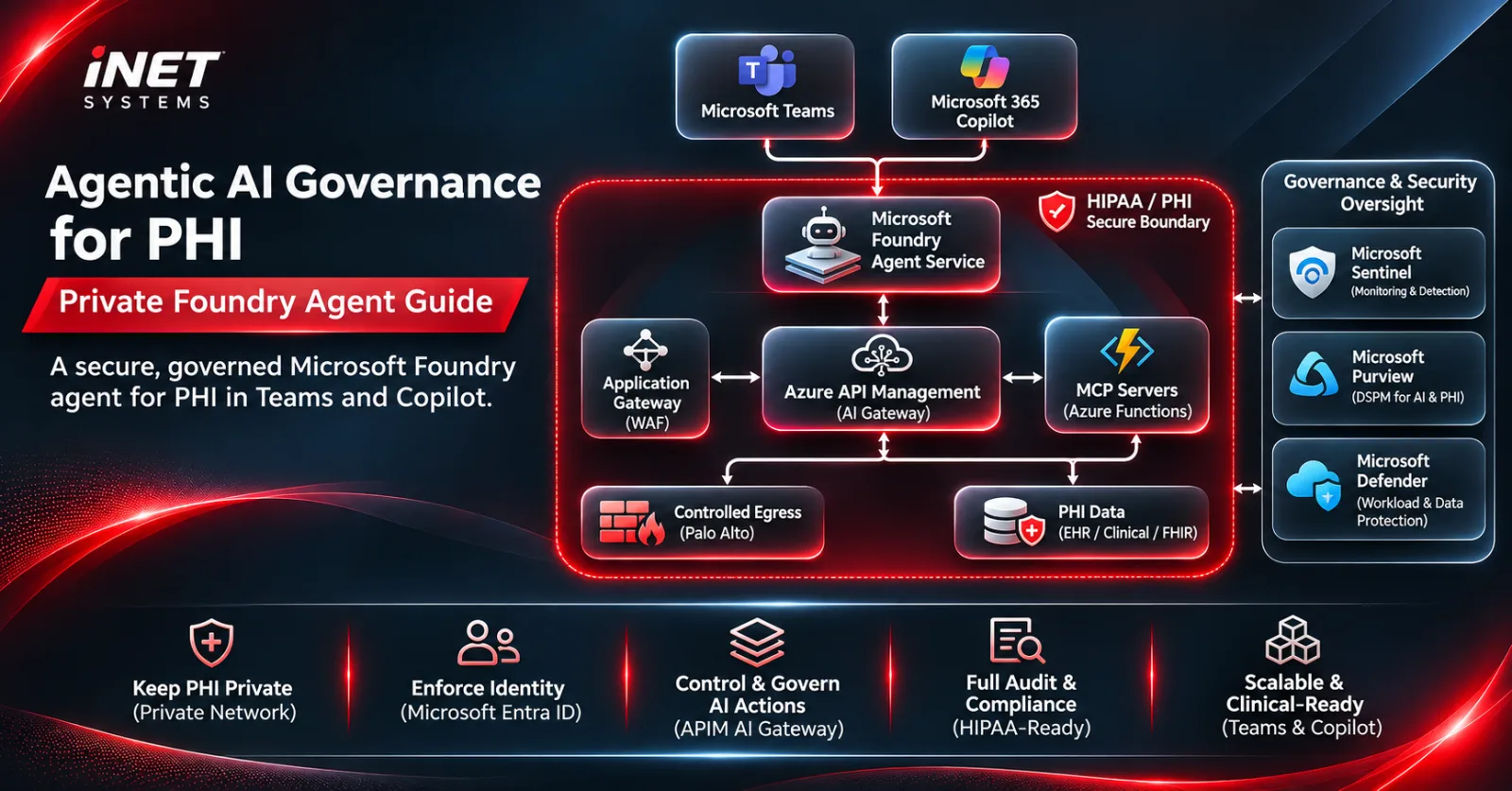
Key takeaway: A Health Insurance Portability and Accountability Act (HIPAA) artificial intelligence (AI) agent must keep every action on protected health information (PHI) private, identified, limited and audited. The iNET SYSTEMS Secure PHI AI Platform does this on Azure: a private Microsoft Foundry agent that clinicians use in Teams and Microsoft 365 Copilot, with an Azure API Management AI gateway, Entra-only MCP tools, controlled egress, Sentinel, Purview and Defender.
Healthcare teams want AI agents that can look up a patient record, summarize an encounter or triage a security alert, often as the first use case in an enterprise AI consulting engagement. Compliance teams want to know where the PHI goes. Most “AI in healthcare” demos skip that second question. This post doesn’t.
At iNET SYSTEMS we designed and documented a production architecture for exactly this: an AI agent on Microsoft Foundry that reads PHI through custom tools, runs entirely inside a private Azure network, and is used by staff directly in Microsoft Teams and Microsoft 365 Copilot. Below is how it works, the design decisions behind it, and why we treat agentic AI governance as an architecture problem, not a policy document.
What this solution gives you
- Clinicians and analysts chat with an AI agent in the tools they already use: Teams and Microsoft 365 Copilot.
- PHI never crosses a public network; Foundry, tools and data sit behind private endpoints.
- Every tool call is authenticated with Microsoft Entra ID; no shared keys.
- AI token spend is capped per team, so one runaway agent cannot blow the budget.
- Every prompt, response and denied request is auditable for HIPAA.
What makes an AI agent HIPAA-ready?
A HIPAA-ready AI agent runs under technical controls that decide which AI agents may touch protected health information, through which tools, under whose identity, at what volume, and with what audit trail. Those controls turn HIPAA principles such as minimum necessary and access control into enforced runtime policy.
A policy that says “agents must only access approved data” is not governance. A gateway that rejects any tool call without the right Entra token and app role is. That is the line we draw in every healthcare engagement, and it is why this solution is built around four control points:
- Private network: the agent, its models, its tools and the PHI stores live inside the customer’s Azure virtual network.
- Identity: users, the agent and every service authenticate with Microsoft Entra ID and managed identities.
- Gateway: Azure API Management (APIM) acts as the AI gateway for models and Model Context Protocol (MCP) tools.
- Oversight: Microsoft Sentinel, Defender and Purview watch the agent and its data.
For the broader program view, see our agentic AI governance framework for chief information security officers (CISOs).
What does the architecture look like?
The agent runs in Microsoft Foundry Agent Service inside a private virtual network, and reaches its tools only through an Application Gateway with web application firewall (WAF) and an APIM AI gateway. The diagram at the top of this post shows the recommended design: everything inside the red line is the private HIPAA/PHI boundary.
| Step | Flow | What happens |
|---|---|---|
| 1 | User to agent | Staff chat in Teams or Microsoft 365 Copilot; messages arrive through Azure Bot Service. |
| 2 | Agent to gateway | The agent calls the private Application Gateway with an Entra token; the WAF inspects and forwards to APIM. |
| 3 | APIM to models | APIM validates the token, applies token limits and quotas, records usage and routes to a healthy Foundry model deployment. |
| 4 | APIM to MCP tools to PHI | APIM applies per-tool rate limits and calls MCP servers on Azure Functions with its own managed identity; the Functions read Fast Healthcare Interoperability Resources (FHIR), Structured Query Language (SQL) or Storage over private endpoints. |
| 5 | Future application programming interfaces (APIs) | Existing Representational State Transfer (REST) or FHIR APIs can be exposed as MCP tools from APIM. |
| 6 | Controlled egress | Calls to Microsoft-hosted services leave only through a Palo Alto next-generation firewall with a fully qualified domain name (FQDN) allowlist. |
| 7 | Telemetry | APIM sends metadata and token metrics, never request or response bodies, to a restricted Log Analytics workspace. |
The core components are standard Azure services, configured for PHI:
| Component | How we configure it | Why |
|---|---|---|
| Microsoft Foundry + Agent Service | Standard Agent Setup, bring-your-own virtual network (VNet), public network access disabled | Models and agent orchestration stay private |
| Application Gateway v2 + WAF | Private frontend Internet Protocol (IP), Open Worldwide Application Security Project (OWASP) rule set tuned for MCP JSON-RPC, response buffering off | Single private Layer 7 entry point |
| Azure API Management | Premium v2, VNet-injected, two or more units across zones, no body logging | Identity-aware AI gateway |
| MCP servers on Azure Functions | Private endpoint, Easy Auth with Entra ID, function keys disabled | Custom tools that read PHI |
| PHI data sources | Azure Health Data Services (FHIR), Azure SQL or Storage via private endpoints | Systems of record |
| Palo Alto next-generation firewall (NGFW) | Default-deny egress via user-defined route (UDR), App-ID and FQDN allowlist | No uncontrolled internet access |
Why put an AI gateway in front of the agent’s tools?
Because Application Gateway and WAF protect the network edge but do not understand identities, AI tokens or MCP tools. Without an AI gateway, AI spend is uncapped per consumer, one agent cannot be rate-limited without blocking all of them, and PHI tools rely on a single layer of authentication.
We evaluated two options before recommending APIM:
| Criterion | Option A: without APIM | Option B: with APIM (recommended) |
|---|---|---|
| Token validation | Only at each backend; the gateway forwards requests with or without a token | Central at APIM, then again at each backend |
| Rate limiting | By client IP only; all agents share one subnet IP | Per consumer, identity, MCP tool and model |
| AI cost control | Shared deployment quota only | Token-per-minute limits and monthly quotas per consumer |
| Cost visibility | Total spend only | Usage by consumer, project and model for chargeback |
| Model resilience | Single deployment | Load balancing and failover across deployments |
| MCP governance | Each server configured separately | One governed MCP endpoint with per-tool policies |
The runaway-agent cost example
Here is the illustrative calculation from our design, using an assumed blended price of $5 per million tokens (swap in your real model price from the Azure pricing page):
- An agent stuck in a reasoning or tool loop sends 40,000 tokens per turn.
- At 20 turns per minute, that is 48 million tokens per hour.
- At the assumed price, that is $240 per hour, or $14,400 over an unnoticed 60-hour weekend.
- With an APIM limit of 50,000 tokens per minute for that consumer, the loop is throttled within a minute and everyone else keeps working.
The gateway policies are short. This illustrative APIM policy validates the agent’s Entra token and role, rate-limits per calling app, and calls the MCP backend with APIM’s own managed identity:
<inbound>
<validate-azure-ad-token tenant-id="{{tenant-id}}" failed-validation-httpcode="401">
<client-application-ids><application-id>{{agent-identity-client-id}}</application-id></client-application-ids>
<audiences><audience>api://mcp-gateway</audience></audiences>
<required-claims><claim name="roles" match="any"><value>MCP.Invoke</value></claim></required-claims>
</validate-azure-ad-token>
<rate-limit-by-key calls="60" renewal-period="60" counter-key="@(context.Request.Headers.GetValueOrDefault("Authorization","").AsJwt()?.Claims.GetValueOrDefault("appid","anonymous"))" />
<authentication-managed-identity resource="api://mcp-functions" />
</inbound>For models, the llm-token-limit policy adds per-consumer tokens-per-minute limits and monthly quotas (see also the AI gateway capabilities in Azure API Management). One rule we never break: semantic caching is only for questions with no PHI, so one patient’s answer can never be served to another.
“In healthcare AI, the gateway is where governance stops being a slide and starts being enforced. If an MCP tool that reads PHI can be reached without a validated token, a role and a rate limit, you don’t have an agent platform yet. You have a breach waiting for a misconfiguration.”
iNET SYSTEMS AI Practice
How does a private agent work inside Teams and Copilot?
The Foundry agent is published to Microsoft Teams and Microsoft 365 Copilot through Azure Bot Service. Microsoft 365 does not support private network connectivity for agents, so only the agent’s Activity Protocol route is exposed, through a Microsoft-managed, source-IP-filtered endpoint with token authorization; every other Foundry application programming interface (API) stays private.
Microsoft documents this pattern for private projects in Publish agents to Microsoft 365 and Teams by using the REST API. In our design that means:
- No public Internet Protocol addresses (IPs) we own: no destination network address translation (DNAT) rule, public IP or public Domain Name System (DNS) record is deployed for the agent.
- Two checks on every message: source IP filtering to Bot Service and Microsoft 365 ranges, then validation of the signed channel token and tenant authorization.
- Restricted audience: pilot with the Shared scope (BotServiceRbac), then publish to the Tenant scope (BotServiceTenant) restricted to approved clinical and security groups, with multi-factor authentication (MFA) and compliant-device Conditional Access.
- PHI in Microsoft 365: agent responses become Teams and Copilot data, so we confirm both are in scope of the client’s Microsoft HIPAA Business Associate Agreement (BAA) and apply Purview retention and eDiscovery.
- Minimum necessary: agent instructions are written so responses include only the PHI the user needs.
How do Sentinel, Purview and Defender fit in?
They connect in two different ways. Microsoft Sentinel is a tool the agent calls, while Microsoft Purview and Defender for Cloud govern and protect the Foundry platform itself.
| Service | Role | What it provides |
|---|---|---|
| Sentinel MCP server | Tool the agent calls via controlled egress and delegated Entra Open Authorization (OAuth) | Data exploration with Kusto Query Language (KQL), plus triage of Defender extended detection and response (XDR) incidents, alerts, devices and vulnerabilities |
| Microsoft Purview for Foundry | Governance of AI interactions | Audit, data security posture management (DSPM) for AI, data loss prevention (DLP), Insider Risk, eDiscovery and retention for prompts and responses |
| Defender for Cloud AI threat protection | Protection of the platform | Alerts for jailbreak and prompt attacks, routed to Defender XDR and Sentinel |
Two details matter for PHI. Purview enforces DLP only on calls that carry the end user’s Entra context; agent-only calls are audited but not blocked. And security data is often PHI too (user names, device names of clinical workstations, DLP matches), so we treat Sentinel tool output as PHI.
Which HIPAA controls does it cover?
The design maps directly to the HIPAA Security Rule technical safeguards in 45 Code of Federal Regulations (CFR) 164.312:
| HIPAA safeguard | How the platform implements it |
|---|---|
| Access control, 164.312(a) | Entra ID authentication, app roles, managed identities, Conditional Access, no shared keys |
| Audit controls, 164.312(b) | Caller identity, tool name and resource IDs logged (never PHI values) to a restricted workspace, plus Entra and Foundry traces |
| Integrity, 164.312(c) | WAF filtering, end-to-end Transport Layer Security (TLS), managed identities instead of stored secrets |
| Transmission security, 164.312(e) | Private endpoints, TLS 1.2 or later, no public paths for PHI |
Every service in the PHI path must also be covered by the Microsoft HIPAA Business Associate Agreement. Preview features, including parts of Sentinel MCP, are often out of scope, so we keep previews out of the PHI path until the compliance team approves them.
How do you roll it out?
We roll it out in five phases, proving the riskiest assumptions first:
- Private foundation: Foundry with Standard Agent Setup and bring-your-own VNet, private DNS, Functions with private endpoints, Easy Auth and app roles; function keys disabled.
- Gateway: Application Gateway v2 with WAF, then APIM Premium v2 with VNet injection, token validation, rate limits, token quotas and the Foundry AI Gateway per project.
- Egress and security tools: Palo Alto default-deny egress with Entra and MCP decryption exclusions, then the Sentinel MCP tools with delegated OAuth.
- Channel: Azure Bot Service (single tenant), publish via REST API to a pilot group, admin approval, then Tenant scope for approved groups.
- Oversight and proof: Purview Data Security and DSPM for AI, Defender for Cloud AI plan, BAA review, and negative tests: no token, wrong audience, rate and token limits, public access attempts and WAF blocks.
We run an end-to-end proof of concept early, because Microsoft documents private MCP on Azure Container Apps rather than Functions behind Application Gateway (see Set up MCP server authentication). If the Functions path does not hold, Container Apps with internal ingress is the fallback. If you are still building your Azure foundation, start with our secure Azure landing zone guide.
Deploy the iNET SYSTEMS Secure PHI AI Platform
iNET SYSTEMS has this solution ready. We have designed and documented the full architecture above: private Microsoft Foundry agents in Teams and Microsoft 365 Copilot, an APIM AI gateway, Entra-secured MCP tools on Azure Functions, Palo Alto egress, and Sentinel, Purview and Defender oversight.
What you get from us:
- An agentic AI governance and security assessment of your current Azure and AI setup.
- A solution architecture design tailored to your PHI data sources (FHIR, SQL, Storage).
- Proof of concept of the private tool path and Teams/Copilot publishing.
- Infrastructure as code, gateway policies, and a HIPAA control map for your auditors.
Book a HIPAA AI agent assessment or talk to our Azure consulting team about the Secure PHI AI Platform.
