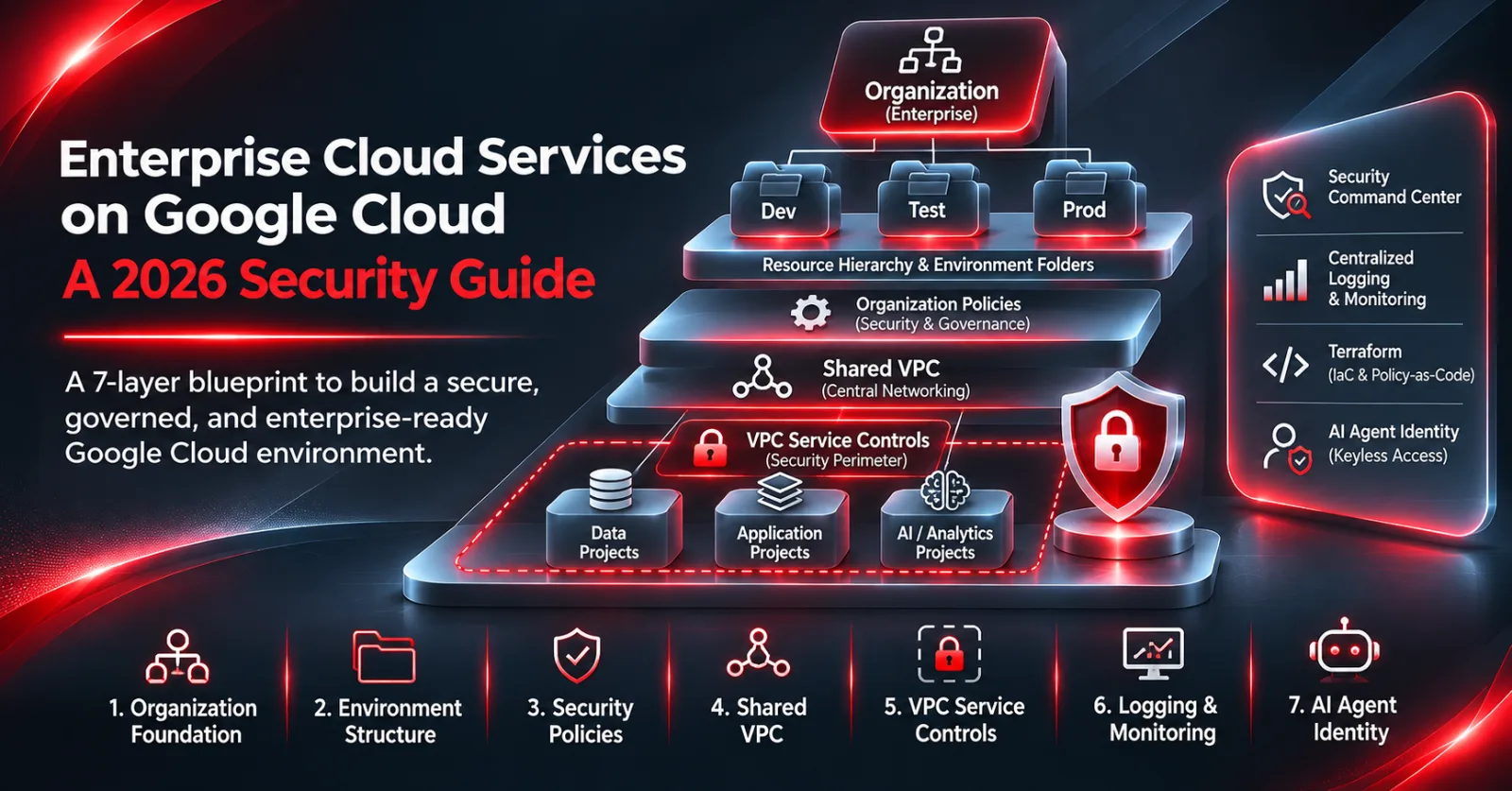
Key takeaway: Google Cloud security for the enterprise starts with a governed foundation: one organization, environment folders, enforced organization policies, Shared virtual private cloud (VPC), VPC Service Controls around sensitive data, centralized logging, and everything deployed through Terraform. In 2026, add a seventh layer: dedicated identities and keyless credentials for artificial intelligence (AI) agents.
Enterprise Google Cloud estates tend to fail security reviews for the same reason: teams start with projects and only later try to retrofit governance. We’ve seen it repeatedly in assessments. This guide is the build order we use at iNET SYSTEMS, updated for Google Cloud’s November 2026 agent-security announcements.
What does Google Cloud security cover for an enterprise?
Enterprise cloud services are the governed compute, data, networking, identity and AI platforms an organization runs in the cloud under central security, compliance and cost controls. On Google Cloud, that means workloads deployed into a managed organization hierarchy, not a loose collection of projects with individual owners.
The distinction matters for chief information security officers (CISOs) and chief technology officers (CTOs). A startup can run on a handful of projects. An enterprise needs separation of duties, auditable change, data residency and a defensible answer to “who can reach production data?”
Google’s own reference for this is the enterprise foundations blueprint. It describes a single organization, environment-based folders, organization policy constraints, Shared VPC networking, aggregated log sinks and a Terraform pipeline in Cloud Build with policy-as-code checks. We use it as the baseline, then harden it for each client’s regulatory scope.
What changed in Google Cloud security in November 2026?
In early November 2026, Google Cloud announced a set of capabilities aimed at securing AI agents and removing static credentials (Google Cloud blog). For enterprise teams, the practical change is that agent identity and keyless access are now first-class platform features rather than custom engineering.
As reported by iTWire:
- Auth Manager (generally available): a Google-managed credential vault governed by identity and access management (IAM).
- Agent Identity JSON Web Token (JWT) support (preview): token-based identity for AI agents.
- Identity-based VPC Service Controls (generally available): perimeter rules that consider who is calling, not only where from.
- Model Armor custom topic detection (preview): custom content guardrails for model prompts and responses.
- Cloud next-generation firewall (NGFW) advanced malware sandboxing (generally available).
- CodeMender (preview): an autonomous code-security agent with sandboxed exploit verification and human-in-the-loop controls.
- Wiz and Google Security Operations: Wiz Defend and Google Security Operations now share a data model with bi-directional sync, plus Wiz AI static application security testing (SAST) in preview.
If you are running Vertex AI agents today, the identity-based VPC Service Controls and Agent Identity items are the two to evaluate first.
How do you secure Google Cloud for the enterprise?
Build seven layers in order: hierarchy, organization policy, identity, network, data perimeter, detection and logging, then AI workloads, all deployed as code. Skipping the order is how teams end up with production data in a project nobody governs.
- Resource hierarchy. One organization node. Top-level folders by environment (production, non-production, development) and a separate folder for shared services such as networking and logging. Label every project for owner, cost center and data classification.
- Organization policies. Enforce constraints at the org or folder level: block service account key creation, restrict resource locations to approved regions, disable default network creation, enforce uniform bucket-level access, and restrict public Internet Protocol addresses (IPs) on virtual machines (VMs). These are your guardrails, not your aspirations.
- Identity and IAM. Federate your workforce identity provider to Cloud Identity. Grant roles to groups, never individuals. Prefer predefined or custom least-privilege roles over Owner and Editor. Use Workload Identity Federation for continuous integration and continuous delivery (CI/CD) and external workloads so no static keys exist.
- Network. Shared VPC per environment, managed centrally, with a hub-and-spoke design for hybrid connectivity. Private Google Access and Private Service Connect keep traffic to Google application programming interfaces (APIs) off the internet. Cloud NGFW enforces east-west and egress policy.
- Data perimeter. Wrap projects holding regulated data in VPC Service Controls perimeters so that even a valid credential can’t copy data out to an unapproved project. Pair with Cloud Key Management Service (KMS) customer-managed keys where your compliance scope requires it.
- Detection and logging. Aggregate audit, VPC flow and data access logs to a central logging project with locked retention. Turn on Security Command Center for posture and threat detection, and feed findings to your security information and event management (SIEM), whether Google Security Operations or Microsoft Sentinel in a multi-cloud estate.
- AI workloads and agents. Give every Vertex AI agent its own service account or Agent Identity, keep it inside a VPC Service Controls perimeter, add Model Armor guardrails, and log every tool call. This is where cloud security and agentic governance meet.
Deploy all seven through Terraform in a CI/CD pipeline with policy checks, starting from Google’s open-source terraform-example-foundation. Console changes in production should trigger an alert, not a shrug. Our CI/CD security guide for AWS, Azure and Google Cloud Platform (GCP) covers the pipeline controls. All of this sits on Zero Trust principles as described in National Institute of Standards and Technology (NIST) Special Publication (SP) 800-207.
How does Google Cloud compare with AWS and Azure for enterprise security?
All three hyperscalers can host secure enterprise cloud services; the controls map closely but carry different names. Google Cloud’s distinctive strength is VPC Service Controls, a data-exfiltration perimeter at the application programming interface (API) layer that has no exact one-to-one equivalent on Amazon Web Services (AWS) or Azure. For the Azure side, see our Azure landing zone guide.
| Control | Google Cloud | AWS | Azure |
|---|---|---|---|
| Hierarchy | Organization › folders › projects | AWS Organizations › organizational units (OUs) › accounts | Management groups › subscriptions › resource groups |
| Preventive guardrails | Organization Policy Service | Service control policies (SCPs) | Azure Policy |
| Reference foundation | Enterprise foundations blueprint | Control Tower / Landing Zone Accelerator | Azure landing zone (Cloud Adoption Framework) |
| Keyless workload access | Workload Identity Federation | IAM roles + OpenID Connect (OIDC) federation | Managed identities + workload identity federation |
| Data exfiltration perimeter | VPC Service Controls | VPC endpoint policies + data perimeter patterns | Private endpoints + network security perimeter |
| Posture and threats | Security Command Center | Security Hub + GuardDuty | Defender for Cloud |
| SIEM | Google Security Operations | Security Lake + partner SIEM | Microsoft Sentinel |
In multi-cloud estates we usually standardize on one SIEM and one infrastructure as code (IaC) toolchain (Terraform) across providers, then accept provider-native preventive controls underneath. Our guide to cloud modernization services on AWS and Azure covers that pattern in more depth.
What are the most common GCP security mistakes?
The most common mistakes are downloadable service account keys, Owner or Editor roles granted broadly, and sensitive data outside any perimeter. All three are preventable with organization policies set on day one.
What we find most often in Google Cloud assessments:
- Service account keys checked into repos or CI variables instead of Workload Identity Federation.
- The primitive Editor role on default compute service accounts, giving every virtual machine (VM) broad project access.
- Projects created outside the folder hierarchy by “temporary” teams that became permanent.
- Data access audit logs left disabled for BigQuery and Cloud Storage holding regulated data.
- AI agents on Vertex AI reusing a developer’s credentials or a shared service account.
- No VPC Service Controls around BigQuery datasets that feed AI models.
“On Google Cloud, the organization policy is the cheapest security control you’ll ever buy. One constraint that blocks service account key creation removes a whole class of breach paths before anyone writes a line of application code. Get the hierarchy and policies right first; everything else is easier on top of them.”
iNET SYSTEMS Cloud Practice
Book a Google Cloud security assessment
Running enterprise cloud services on Google Cloud, or planning a move? iNET SYSTEMS will review your hierarchy, organization policies, IAM, perimeters, logging and AI agent identities against the enterprise foundations blueprint and your compliance scope, then hand you a prioritized fix plan. Book a cloud security assessment or talk to our Google Cloud consulting team.
